
TrendTrack Chrome Extension: The Free Tool You Need
Why Start with the Free TrendTrack Extension
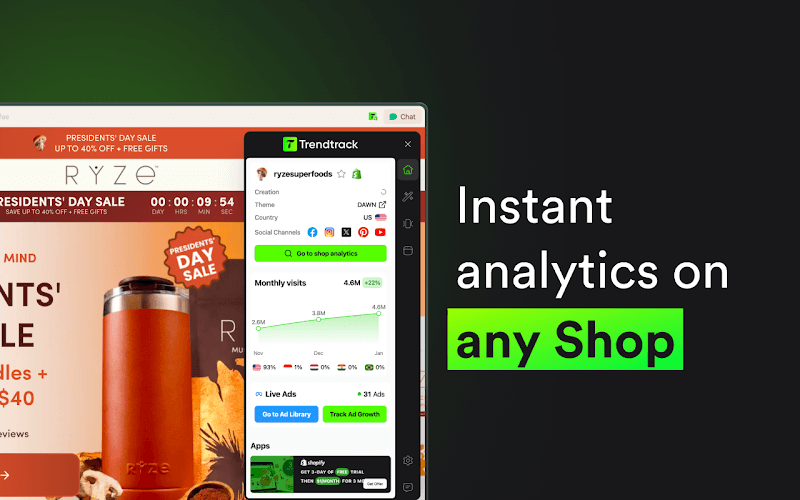
You do not need to spend a single euro to start using TrendTrack (sometimes searched as TrendTracker). The TrendTrack Chrome extension is completely free, works with a free TrendTrack account, and gives you powerful Shopify store analysis on any store you visit. With a 4.9/5 rating and over 10,000 users, it is one of the highest-rated e-commerce tools in the Chrome Web Store.
Whether you are just starting your e-commerce journey or you are an experienced seller evaluating a new niche, the TrendTrack extension is an indispensable research companion. This TrendTrack review guide covers everything it does, how to get the most out of it, and how it connects to TrendTrack's broader ecosystem of free tools.
Installation and Setup
Step 1: Install the Extension
The TrendTrack Chrome extension is available on the Chrome Web Store (Chrome browser only). Search for “TrendTrack” or visit the direct link from trendtrack.io. Click “Add to Chrome” and confirm the installation.
Step 2: Create a Free Account
You need a TrendTrack account to use the extension. The good news: TrendTrack operates on a freemium model, so creating a free account costs nothing. Sign up with your email, verify it, and you are ready to go. No credit card required.
Step 3: Pin the Extension
After installation, click the puzzle icon in Chrome's toolbar and pin the TrendTrack extension for easy access. A small TrendTrack icon will appear in your toolbar. When you visit any Shopify store, it will light up to indicate it detected a Shopify site.
Automatic Shopify Store Detection
The extension's first job is simple but essential: it detects whether any website you visit is a Shopify store. This sounds basic, but it saves significant time. When browsing ads on Facebook or Instagram, you can click through to any store and instantly know if it runs on Shopify. No need to check the page source or look for telltale signs manually.
Want to try this yourself? Start a free TrendTrack account →
What the Extension Shows You
When you are on a Shopify store, click the TrendTrack icon. A side panel opens with detailed information:
Store Basics
- Store creation date: When the Shopify store was first set up. New stores (created in the last few months) with high traffic are especially interesting for product research.
- Shopify theme: Which theme the store uses (Dawn, Debut, Impulse, custom, etc.). Useful for understanding their design approach.
- Country: Where the store is registered.
- Language: The primary language of the store.
- Currency: The default currency used for pricing.
Traffic Data
The extension displays estimated monthly traffic for the last 3 months, along with the traffic growth percentage. This gives you an immediate sense of whether a store is growing, stable, or declining. Use these numbers directionally to compare stores against each other.
Top Products
Two product views are available:
- Best sales: Products estimated to generate the most revenue. These are the store's winners.
- Last added: The most recently added products. These reveal what the store is currently testing or launching.
This is incredibly valuable when you land on a general store with hundreds of products. Instead of browsing every page, the extension immediately tells you which products matter.
Shopify Apps and Pixels
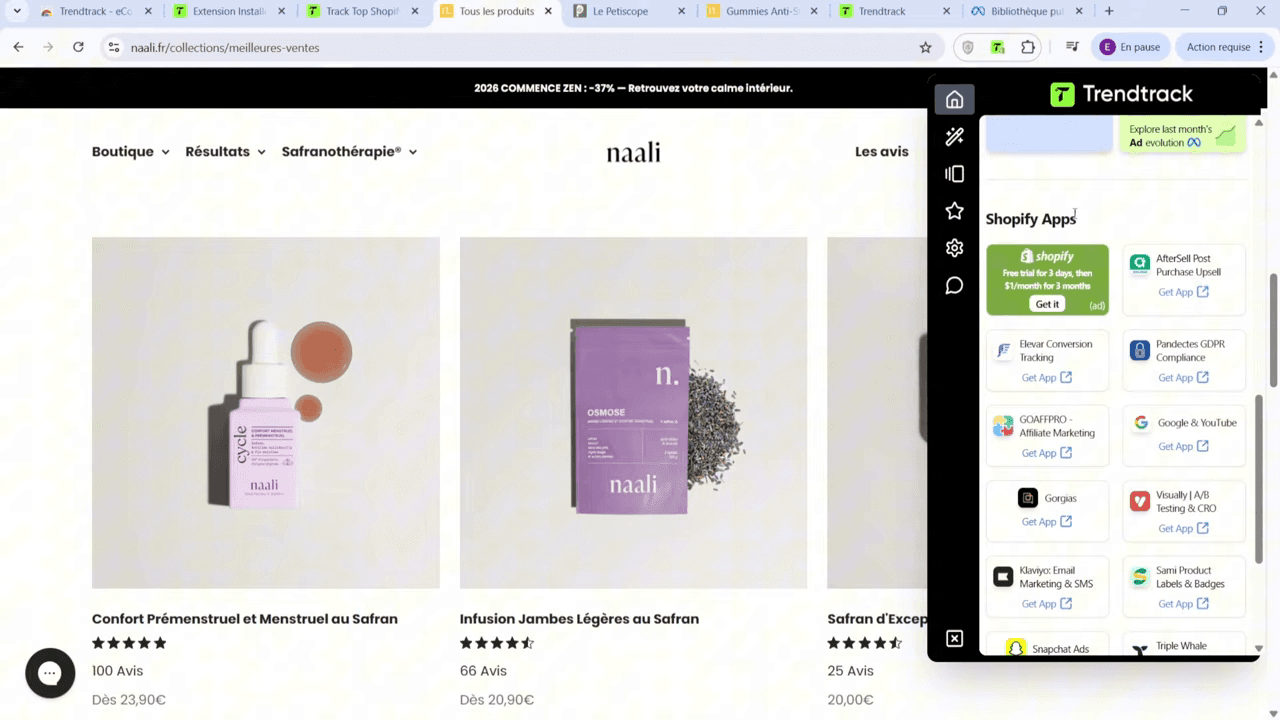
The extension detects and lists all Shopify apps installed on the store and all tracking pixels present. This reveals:
- Which analytics tools they use (Triple Whale, Google Analytics, Hotjar)
- Which ad platforms they run on (Facebook Pixel, TikTok Pixel, Google Ads, Snapchat)
- Which email marketing platform (Klaviyo, Mailchimp, Omnisend)
- Which review app (Loox, Judge.me, Yotpo)
The app stack tells you how sophisticated the operator is. A store running Triple Whale, Klaviyo, and multiple ad pixels is a professional operation.
Ad Library Link
The extension provides a direct link to the store's Facebook Ad Library page. One click takes you to see all their active ads on Meta platforms. This saves you the manual process of searching for their Facebook page and navigating the Ad Library.
Social Links
All social media profiles linked to the store are displayed: Facebook, Instagram, TikTok, YouTube, Twitter/X, Pinterest, etc. This lets you quickly assess their social media presence and organic strategy.
The Multiple Facebook Pages Trick
Here is a tip that most casual users miss: one Shopify store can have multiple Facebook pages running ads. The extension shows you the primary linked page, but professional e-commerce operators often run ads from 2, 3, or even 5+ different Facebook pages. They do this to test different brand angles, target different audiences, or scale beyond the limits of a single ad account.
When you find an interesting store, always check TrendTrack's full platform (not just the extension) to see all associated Facebook pages. Analyzing only one page gives you an incomplete picture.
The Free Ecom Toolbox
Beyond the TrendTrack extension, TrendTrack offers a Free Ecom Toolbox — a collection of useful calculators and tools accessible directly on trendtrack.io, no subscription required.
Ready to find your next winner? Try TrendTrack free — no credit card needed →
7 Free Tools on TrendTrack's Website
Here is every free tool available:
- Chrome Extension: The store analysis tool we just covered. Free forever with a free account.
- Profit Margin Calculator: Input your cost price and selling price to calculate your profit margin percentage. Simple but essential for evaluating product viability.
- Shopify Subscription Calculator: Calculates the true cost of Shopify plans including transaction fees. Helps you choose the right plan based on your expected revenue.
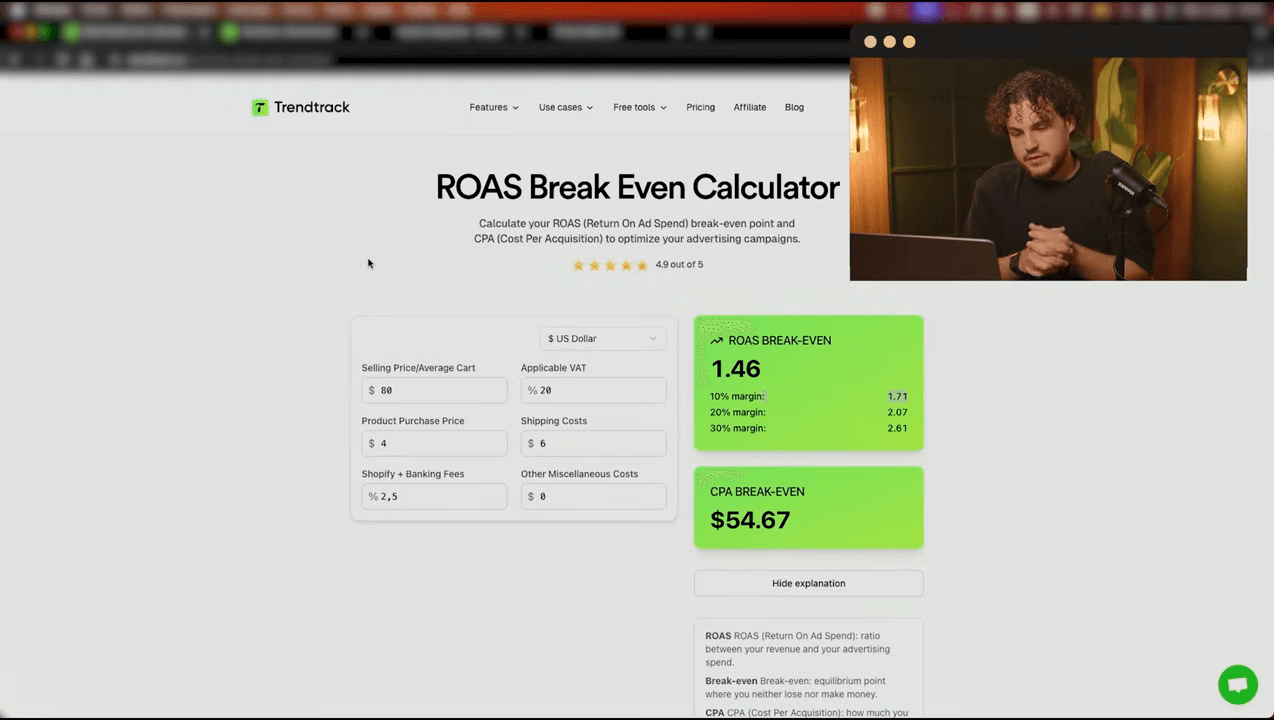
- ROAS Break Even Calculator: Enter your product cost, selling price, and ad spend to calculate the minimum ROAS (Return on Ad Spend) you need to break even. Critical for setting ad campaign targets.
- Shopify Apps Detector: Enter any Shopify store URL and get a list of all apps installed, without visiting the store. Works similar to the extension but accessible from any browser.
- Shopify Theme Detector: Enter a store URL to identify the Shopify theme. Useful when you want to replicate a store's design aesthetic.
- Shopify Product Exporter: Export a Shopify store's product catalog (names, prices, images, descriptions) to a spreadsheet. Useful for competitive analysis and catalog research.
These seven tools cover the most common calculations and data lookups that e-commerce sellers need daily. Bookmark them and use them as part of your regular workflow.
Free Account vs Paid Plans
The free account gives you access to the Chrome extension and the 7 website tools. But TrendTrack's full power — the Trending Shop database of nearly 1.5 million stores, the 174M+ ad database, Brand Tracker, advanced filters, and segments — requires a paid plan.
Here is a practical way to think about it: use the free tools to learn and validate your interest in e-commerce intelligence. Install the extension, browse stores in your niche, use the calculators to evaluate margins. Once you find yourself wanting more data — wanting to search and filter across all Shopify stores, wanting to track competitor ads systematically — that is when a paid plan makes sense.
TrendTrack's paid plans start at $59/month (Starter), with the recommended Pro plan at $89/month and the Business plan at $149/month. Quarterly billing saves 15%, and annual billing saves 30%. For a tool that directly impacts your product selection and advertising strategy, the ROI is clear if you use it consistently.
Practical Free Workflow
Here is how to use the free tools effectively, even without a paid subscription:
- Browse Facebook/Instagram ads in your target niche. When something catches your eye, click through to the store.
- Use the Chrome extension to instantly analyze the store: traffic, products, apps, pixels.
- Check the Ad Library link to see all their active ads.
- Use the Profit Margin Calculator to evaluate product viability (find the product on AliExpress, calculate margins against the store's selling price).
- Use the ROAS Break Even Calculator to determine if you can profitably advertise the product.
- Use the Product Exporter to save interesting product catalogs for comparison.
This workflow costs nothing and gives you a structured approach to product research that puts you ahead of most beginners who rely on gut feeling alone.
See these features in action: Get 20% off your first plan →
Conclusion
The TrendTrack extension and free toolbox are the best free e-commerce intelligence tools available in 2026. The extension gives you instant store analysis on any Shopify site, and the 7 free website tools cover essential calculations for product evaluation. Start here, build your research habits, and upgrade to a paid plan when you are ready to access the full database and advanced features. The extension alone — with its traffic data, product insights, app detection, and ad library links — is a tool every e-commerce seller should have installed. For a deep dive into TrendTrack pricing and all paid features, see our TrendTrack pricing breakdown and read our full TrendTrack review. Considering a TrendTrack alternative? See our honest comparison. Once you have the extension installed, learn how to find winning products with TrendTrack and master every filter in the platform. Have questions? Our TrendTrack FAQ covers the most common ones.
Tips for Power Users
Even experienced sellers underutilize the Chrome extension. Here are advanced tips to get more value:
- Browse competitor stores daily: Make it a habit. When you see a Facebook ad, click through and check the extension. Over time, you build an intuitive sense of what successful stores look like — their tech stack, their traffic levels, their product counts.
- Compare app stacks across stores: If three successful stores in your niche all use Loox for reviews and Klaviyo for email, that is a signal those tools work for your category. Match your tech stack to proven operators.
- Use creation date strategically: A store created 6 months ago with 80K traffic means they grew fast in half a year. That is an exceptional growth rate and strongly suggests a winning product.
- Check pixels for ad strategy: A store with Facebook Pixel, TikTok Pixel, and Google Ads is running ads on all three platforms. This indicates either a very profitable product (supporting multi-platform spend) or an experienced operator testing channels.
- Combine with the Product Exporter: Use the extension to identify interesting stores, then use the free Product Exporter tool to download their full catalog. Analyze pricing, product count, and category distribution in a spreadsheet.

Arnaud
E-commerce entrepreneur and tool tester since 2020. I analyze spy tools and e-commerce intelligence platforms to help dropshippers and online sellers make the right choices.