
How to Track Competitor Facebook Ads for E-commerce with TrendTrack
Why Tracking Competitor Facebook Ads Changes Everything
If you want to track competitor Facebook ads effectively, you need more than a screenshot tool. You need impression data, spend estimates, geographic targeting breakdowns, and the ability to monitor changes over time. Most tools give you one or two of these. TrendTrack gives you all of them - backed by real EU/UK data from Meta's Digital Services Act transparency obligations.
This guide walks you through a complete workflow: finding competitor ads, interpreting performance signals, and setting up ongoing monitoring so you're never caught off guard by a competitor scaling a new angle.
Step 1: Find Competitor Ads in TrendTrack's Ad Library
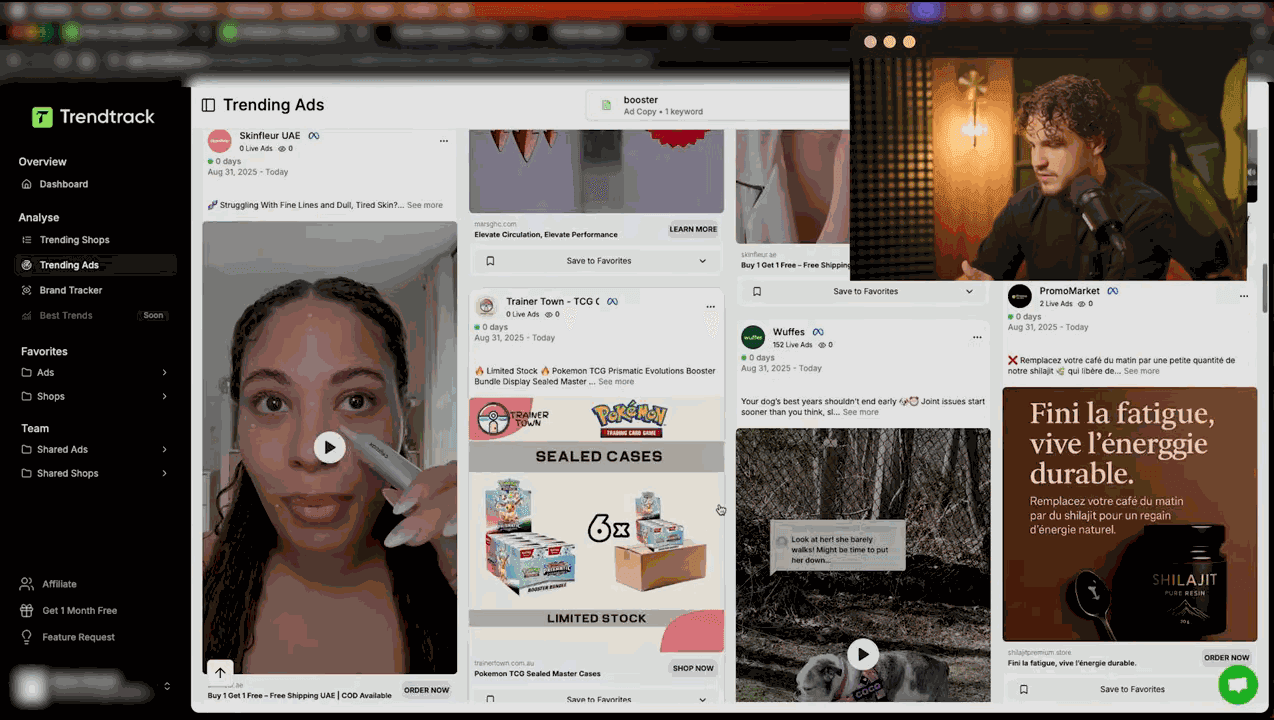
TrendTrack's ad library indexes over 250 million ads. Finding a specific competitor's ads takes under two minutes.
Start by entering your competitor's brand name in the search bar. TrendTrack supports multi-keyword search using a semicolon separator - so you can search BrandA; BrandB; BrandC to pull ads across multiple competitors in a single query. This is particularly useful when you're mapping out an entire competitive landscape rather than stalking a single player.
Once you have results, apply filters to narrow down what matters:
- Active ads only - running ads are far more valuable than archived ones
- Minimum 7 days active - ads running 7+ days have proven profitable; anything shorter is still in testing
- Minimum 30 ads per advertiser - signals a serious operator running a real media buy
You can cross-reference these ad filters with store metrics and page content in a single query - something most single-metric tools can't do. For a deeper look at how to use filters strategically, see our complete guide to TrendTrack filters.
Step 2: Read the Advertisers Page Like a Pro
Once you've found a competitor, click through to their Advertisers page. This is where TrendTrack's EU/UK data advantage becomes obvious. Because Meta is legally required under the Digital Services Act to disclose ad data for EU and UK audiences, TrendTrack can show you metrics that simply don't exist for US-only tools:
- Active and inactive ad count
- EU ad percentage of total spend
- Total impressions (EU/UK)
- Estimated spend
- 14-day daily averages
- Geographic targeting breakdown
The most important metric here is total impressions. Use the table below to interpret what you're seeing:
| Impression Range (EU/UK) | Signal | What It Means |
|---|---|---|
| Under 200K | Testing phase | Competitor is still validating - not yet proven |
| 200K - 500K | Likely winner | Showing consistent spend, worth monitoring closely |
| 500K - 1M | Strong performer | This ad or angle is working - study the creative |
| 1M+ | Super winner | Major scaling underway - act fast or find a new angle |
Pair the impression count with ad duration. An ad with 800K impressions that's been running for 21 days is a confirmed winner. An ad with 800K impressions that launched yesterday is almost certainly a broad-audience blitz test - don't draw conclusions yet.
The 14-day daily averages tell you trajectory. A competitor whose daily impressions are climbing week over week is scaling. One whose averages are flat or declining may be hitting fatigue.
Want to try this yourself? Start a free TrendTrack account →
Ad Duration as a Profitability Signal
This is one of the most underused signals in Facebook ad intelligence. Facebook's algorithm is ruthless: ads that don't convert get cut. Ads that run for 7+ days have passed the market test. Ads running for 30+ days are almost certainly profitable.
When you find a competitor's ad that has been active for over two weeks with 500K+ impressions, you're looking at a proven creative. The next question is: what's the hook?
TrendTrack lets you inspect the creative directly - video, copy, thumbnail, and CTA. Note the first three seconds of any video ad (the hook), the emotional angle in the headline, and whether the ad uses social proof, urgency, or transformation framing. These patterns are what you'll use to develop your own creative variations.
For a structured approach to creative analysis, check out our tutorial on analyzing winning ad creatives with TrendTrack.
The EU/UK Data Advantage Explained
Most Facebook ad spy tools scrape publicly visible ads from browsers or rely on panel data. TrendTrack's EU/UK impression and spend data comes from a different source entirely: Meta's mandatory DSA transparency reporting. This means the numbers aren't estimates based on engagement signals - they're actual impression counts reported by Meta.
For e-commerce brands selling into European markets, this data is gold. You can see exactly how much of a competitor's budget is going into EU geographies, which countries they're targeting heaviest, and whether they're running localized creative or one-size-fits-all international campaigns.
This is a meaningful edge over tools like AdSpy or Dropispy, which rely on different data collection methods. See our TrendTrack vs AdSpy comparison for a full breakdown of what each tool can and can't show you.
Step 3: Set Up Ongoing Monitoring with Brand Tracker
One-time research is useful. Ongoing monitoring is what actually gives you a competitive edge. TrendTrack's Brand Tracker is built specifically for this: you add competitors to a watchlist and get notified when they launch new ads, add new products, shift traffic, or change their creative strategy.
Here's what Brand Tracker tracks for each competitor you add:
- New ads - any new creative launched, with impression data from day one
- New products - products added to their Shopify store, often a signal of what they're about to push hard on Facebook
- Traffic shifts - significant changes in estimated store traffic
- Hooks and scripts - TrendTrack extracts the opening hooks from new video ads, so you can see the angles being tested without watching every single ad
- Creative testing detection - identifies when a competitor is A/B testing multiple variations, meaning they're in discovery mode on a new product
- Media mix analysis - shows whether a competitor is diversifying into new channels or doubling down on a single format
A practical workflow: check Brand Tracker every Monday morning. If a competitor launched 5+ new ads in the past week across two or three new creative angles, they're in testing mode on something new. Watch those ads. In 7-10 days, the ones still running are the winners - and you'll have had a week's head start on understanding what's working before the broader market catches on.
Ready to find your next winner? Try TrendTrack free - no credit card needed →
Hooks and Scripts: The Most Underrated Feature
The hooks and scripts extraction feature in Brand Tracker deserves its own section. In Facebook advertising, the first three seconds of a video - or the first line of a static ad - determine whether someone stops scrolling. Competitors who are scaling have figured out hooks that work.
TrendTrack extracts these hooks automatically and surfaces them in Brand Tracker. You can look at a competitor's last 10 new ads and immediately see the emotional angles they're testing: fear of missing out, social proof aggregation, transformation promises, cost-saving framing. Fresh angles improve conversion rates by 15-25% compared to recycled creative - which is why brands that test aggressively win.
Use this feature not to copy, but to understand the competitive emotional landscape. If five competitors are all running fear-based hooks and none are running aspiration-based hooks, that's a gap worth testing.
Combining Ad Intelligence with Store Analysis
The most powerful use of TrendTrack is cross-referencing ad data with store data. When you find a competitor running a strong ad campaign, click through to their store profile. You'll see their estimated traffic, growth rate, best-selling products, apps installed, and pixels firing.
App stack is particularly revealing. A store running Triple Whale (which costs $100+/month) is a serious operator with real revenue - their ad decisions are worth studying closely. A store running Parcel Panel is handling high order volume. These signals tell you whether a competitor's success is real or a blip.
For a complete walkthrough of store analysis, our Brand Tracker competitor guide covers the full process from initial discovery to ongoing monitoring.
Building a Competitive Intelligence Routine
Here's a simple weekly routine that keeps you ahead without eating your entire Monday:
- Monday (15 min): Check Brand Tracker for new ads from your top 5 competitors. Flag anything with 200K+ impressions already.
- Wednesday (10 min): Review which flagged ads are still running. Ads that survived 48-72 hours are likely being kept for a reason.
- Friday (20 min): Deep-dive on any ad that's been running 7+ days since Monday. Study the hook, the offer, the landing page structure.
This routine costs you 45 minutes a week and keeps you with a consistent window into what's working across your competitive landscape. Compare that to running blind - spending thousands on creative tests without knowing what your competitors have already validated.
For detailed pricing on TrendTrack's Brand Tracker feature (available from the Pro plan at $89/month), see the TrendTrack pricing page. For a full evaluation of whether TrendTrack fits your workflow, read our in-depth TrendTrack review.
See these features in action: Get 20% off your first plan →
Final Thoughts
Tracking competitor Facebook ads isn't about copying - it's about understanding what the market is validating so you can make better decisions with your own budget. TrendTrack gives you the impression data, duration signals, EU/UK transparency reporting, and ongoing monitoring tools to turn competitive intelligence into a repeatable process rather than an occasional ad library browse.
If you're evaluating TrendTrack against other ad intelligence tools, our full alternatives comparison covers the key differences. And if you want to reduce the cost of entry, check available discounts on the TrendTrack promo page.

Colin
E-commerce operator and tool tester since 2020. I run product research and paid media every day, then write up what these platforms actually do once the demo is over. Every review here is based on weeks of real use, paid for out of my own pocket.